
Proton Pass (Android/iOS): A 2025 Review of a Password Manager Built for Passkeys and Real-World Security
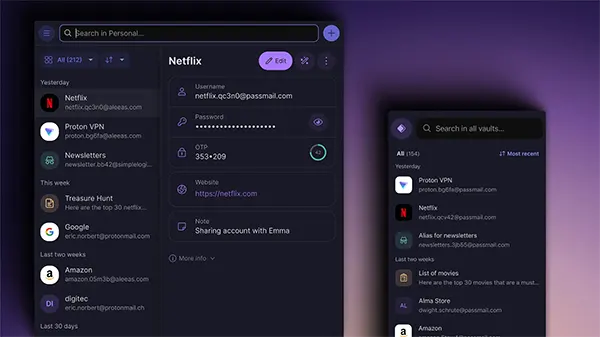
Passwords still cause most account takeovers, but 2025 is also the year when passkeys finally feel like a normal part of everyday logins. Proton Pass is a privacy-focused password manager that supports passwords, passkeys, and encrypted notes, while aiming to keep your data inaccessible to the provider itself. In this review, I’ll focus on what matters in real use on Android and iOS: switching from built-in managers, how passkeys behave across devices, and what the security model actually protects you from.
Switching from Google Password Manager or iCloud Keychain: What’s Easy and What’s Not
If you’re moving from Google Password Manager, the migration is usually straightforward because exporting saved logins from Google/Chrome is a familiar process. After import, the most important practical step is cleaning duplicates and fixing entries with outdated URLs, because autofill accuracy depends heavily on correct website matching. Most users underestimate how many old logins they’ve stored over the years until they see everything in one vault.
For iCloud Keychain users, the transition often feels less direct. Exporting Keychain passwords commonly requires a Mac, and Apple’s ecosystem is designed to keep password storage seamless only inside Apple devices. Once logins are imported, Proton Pass works reliably, but it may not feel as “invisible” as Keychain, simply because you’ll interact with third-party autofill prompts more often.
The key advantage of Proton Pass during switching is flexibility across ecosystems. If you use Android and iOS, or combine Apple hardware with Windows/Linux, a single encrypted vault can reduce confusion and lockout risk. The migration is worth doing when you want consistency and tighter control rather than juggling separate managers that don’t talk to each other well.
Autofill on Android and iOS: The Small Details That Decide Whether You’ll Stick With It
Autofill is the feature that determines whether a password manager becomes part of your routine. On Android, Proton Pass integrates with the system autofill service, allowing it to suggest logins in browsers and apps. It tends to work best when your saved entries are clean: one login per service, accurate website URL, and no duplicates competing for priority.
On iOS, Proton Pass relies on Apple’s autofill framework, which is consistent but less “automatic” than iCloud Keychain. You’ll usually see a prompt, authenticate with Face ID or Touch ID, and then fill credentials. It’s reliable, but it can feel like an extra step if you’re used to Apple’s default setup doing everything silently.
A practical way to avoid frustration is to tidy the logins you use most often first—email, banking, work tools, shopping, and social accounts. Once those core entries are correct, autofill becomes smoother and you’re less likely to get stuck choosing between similar-looking saved items.
Passkeys in 2025: How Proton Pass Handles Passwordless Logins on Mobile
Passkeys are designed to remove password reuse and make phishing significantly harder. In 2025, more major services support them, but the experience still varies depending on how a website implements passkeys and which browser you use. Proton Pass supports passkeys on Android and iOS, and also through its browser extension, which matters because many people create passkeys on desktop but want to use them on mobile without friction.
Proton Pass treats passkeys as a core feature rather than a bonus add-on. You can create a passkey for a compatible service, store it securely in your vault, and use it to sign in without typing a password. For accounts that are frequent targets—your main email, shopping services, travel accounts, and payment-related apps—this can reduce exposure to credential stuffing and common phishing attempts.
It’s still important to understand what passkeys do and don’t solve. Passkeys reduce risks from stolen passwords and fake login pages, but they don’t protect you if your device itself is compromised or if your account recovery methods are weak. In other words, passkeys raise the security baseline, but you still need good device and account hygiene.
Passkeys Across Devices: The Real-World Scenario Most People Care About
The practical question is whether a passkey created on one device will work smoothly everywhere else. Proton Pass aims to make this easier by allowing passkeys to be stored and synced in an encrypted vault, so you’re not forced to stay within one manufacturer’s ecosystem. That is especially useful if you mix Android and iOS, or if you use multiple computers and browsers.
However, passkey behaviour can still vary because not every website and browser combination behaves the same way. The safest approach is to create passkeys for your most important services, test them on both mobile and desktop, and keep at least one secure fallback option available—such as authenticator-based 2FA or stored recovery codes.
If you’re coming from iCloud Keychain, this flexibility can be one of the strongest reasons to consider Proton Pass. Apple’s passkey integration is excellent on Apple devices, but it becomes less convenient when you step outside that environment. Proton Pass is built to stay usable across a wider mix of devices.
Security You Can Measure: Encryption, Zero-Access Design, and the Risks That Still Exist
Proton Pass is built around end-to-end encryption and a zero-access design, meaning the vault is encrypted so the provider cannot read your stored secrets. This matters because it reduces the risk of passwords being exposed in plain text if a provider’s systems are attacked. The goal is that even if data is stolen, it remains unreadable without your credentials.
Another factor many security-focused users care about is transparency. Proton has made Proton Pass apps open source, which allows independent review of how encryption and storage are implemented. Open source is not a guarantee of safety by itself, but it makes it harder for weak security practices to remain hidden for long.
Still, no password manager can protect you from everything. If your phone is compromised, if someone tricks you into handing over access, or if you fail to secure your Proton account properly, your vault can become vulnerable indirectly. In 2025, the most realistic and effective setup is layered: a strong master password, 2FA, a secure device lock, and careful handling of recovery options.
Practical Threat Model: Who Benefits Most from Proton Pass in 2025
Freelancers are often in the highest-risk group because they manage multiple client portals, payments, SaaS accounts, and shared access across different devices. For them, the real benefit is stopping password reuse and moving critical accounts to passkeys when available. One leaked credential can otherwise cascade into client-related incidents or financial trouble.
Small teams also benefit when the alternative is informal password sharing. Proton Pass can help centralise access responsibly, but it should not replace proper permissions inside business tools. The best approach is to use it for the accounts that truly need shared credentials, while still enforcing 2FA and rotating access when people join or leave.
For everyday users, the strongest value is reducing exposure to common attacks without needing deep technical knowledge. Shopping and email accounts are frequent targets, and they often contain saved addresses, payment methods, and personal data. In 2025, using unique passwords and passkeys where possible is part of basic digital hygiene rather than an advanced security habit.