
Notion Calendar for iOS: Can It Replace the Standard iPhone Planner for Work?
Digital planning tools on smartphones have changed significantly in recent years. Apple’s built-in Calendar has long been the default organiser for many iPhone users, particularly for managing meetings, reminders, and work schedules. However, the arrival of Notion Calendar for iOS in 2024–2025 introduced a new approach to planning. Built around the well-known productivity ecosystem of Notion, this calendar combines scheduling with task management, databases, and project tracking. For professionals who rely on their phone to organise daily responsibilities, the key question is whether Notion Calendar can realistically take the place of Apple’s native planner.
What Notion Calendar for iOS Offers for Professional Planning
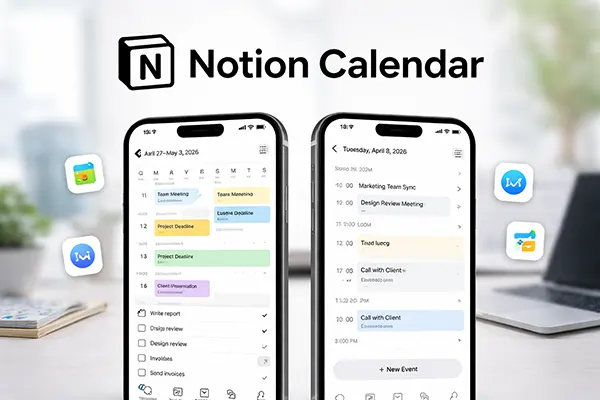
Notion Calendar is closely connected to the broader Notion workspace, which many teams already use for documentation, task boards, and project coordination. When used on an iPhone, the calendar automatically synchronises with Notion databases, allowing events and tasks to exist in the same environment. Instead of separating meetings from project planning, users can view schedules alongside tasks, deadlines, and project notes.
Another practical feature is the ability to link calendar events directly to Notion pages. For example, a meeting scheduled in the calendar can open a document containing preparation notes, checklists, or shared information for a team. This reduces the need to switch between multiple productivity tools, which can save time when preparing for calls or presentations.
The application also integrates with Google Calendar accounts, which remain widely used in professional environments. Many people already rely on Google services for work scheduling, and Notion Calendar acts as a visual interface that overlays those events with additional information stored inside Notion. This combination makes it possible to treat meetings, tasks, and project documentation as part of the same workflow.
Integration with Workflows and Project Management
The strongest advantage of Notion Calendar lies in how it interacts with structured project data. Tasks stored in Notion databases can appear in the calendar as scheduled items, making long-term planning easier to visualise. For instance, a marketing team may track campaign deadlines in a database and instantly see those milestones on the calendar timeline.
Another benefit is the ability to create context around scheduled events. A meeting is no longer just a time slot; it can contain linked documents, research materials, and collaborative notes. This turns the calendar from a simple planner into a coordination centre for ongoing projects.
For remote teams and freelancers, this level of integration can simplify communication. Instead of sharing separate documents and task lists, colleagues can attach everything directly to scheduled sessions. As a result, the calendar becomes part of a broader organisational structure rather than a standalone scheduling tool.
How the Standard iPhone Calendar Still Holds Advantages
Despite the additional capabilities offered by Notion Calendar, Apple’s built-in Calendar still performs extremely well for straightforward scheduling. The native application is deeply integrated into iOS, meaning it works seamlessly with Siri, Spotlight search, Contacts, and system notifications. Creating or editing events can often be done faster through voice commands or quick shortcuts.
Reliability is another important factor. Apple’s calendar system is tightly linked with iCloud and device synchronisation, which has been refined for more than a decade. Events update instantly across iPhone, iPad, Apple Watch, and Mac devices, often without the need for manual refresh.
The interface of the native planner is also intentionally minimal. Many professionals prefer this simplicity when their primary goal is to track meetings and appointments without additional complexity. In situations where quick access and speed matter more than advanced organisation, the built-in option still performs extremely well.
Speed, System Integration, and Everyday Convenience
One of the reasons many iPhone users continue relying on Apple Calendar is its direct integration with the operating system. Notifications appear instantly, travel times can be calculated through Apple Maps, and meeting invitations are automatically connected with email accounts. These small features make daily scheduling efficient without requiring additional configuration.
The application is also lightweight. Unlike productivity tools that combine several functions, the default calendar focuses purely on scheduling. This simplicity can reduce distractions, particularly for users who prefer separating project management from time planning.
Another factor is privacy and data handling. Apple’s services emphasise on-device processing and encrypted synchronisation through iCloud. For individuals and organisations that prioritise privacy, using a native tool may feel more predictable than connecting third-party services.
When Notion Calendar Can Replace the iPhone Planner
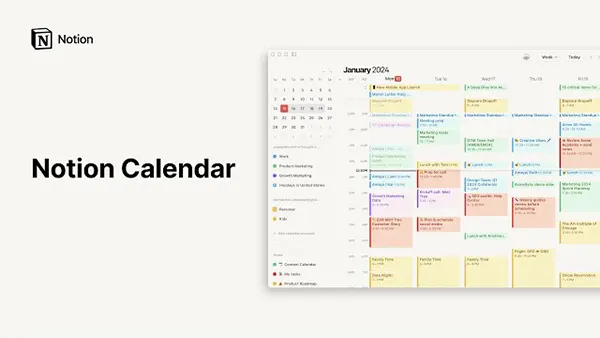
For people who already organise their work inside Notion, switching to Notion Calendar can make sense. Instead of managing deadlines in one place and meetings in another, the calendar can display everything in a unified timeline. This reduces fragmentation across productivity tools and helps maintain a clearer overview of ongoing responsibilities.
Creative professionals, product teams, and researchers often work with complex documentation. In such environments, linking calendar entries with project pages is particularly valuable. A scheduled discussion can automatically connect to planning documents, shared notes, and task lists.
Another advantage appears in collaborative environments. Teams using Notion databases for project tracking can synchronise deadlines and planning stages directly with the calendar view. This visual structure can help everyone see how tasks align with meetings, reviews, and delivery dates.
Situations Where a Hybrid Approach Works Better
In practice, many professionals find that using both calendars offers the most flexibility. Apple Calendar continues handling personal appointments and system notifications, while Notion Calendar focuses on project-related planning and collaborative work.
This hybrid method allows users to benefit from Apple’s system integration while still accessing the organisational tools provided by Notion. Meetings may appear in both calendars, but additional context such as notes, checklists, and documentation remains inside Notion.
As productivity tools continue evolving, the difference between planners and project management environments is becoming smaller. Notion Calendar represents this shift by combining scheduling with knowledge management. Whether it replaces the iPhone planner depends largely on how deeply someone relies on structured project workflows in their daily work.