
Motion Assist in Android 17: How Your Smartphone Tries to Reduce Car Sickness
Using a smartphone in a moving car can quickly become uncomfortable for people who are sensitive to motion sickness. Reading messages, scrolling through a website or watching a video gives the eyes a largely stable view, while the inner ear continues to register every bend, acceleration and change in speed. Android 17 now has a built-in feature intended to make that situation easier for passengers. Motion Assist places small moving visual cues around the edges of the display, giving the eyes an additional indication that the body is travelling through a moving vehicle. Google introduced the feature as part of its September 2026 Android update, following the release of Android 17 earlier in the year. It is a simple idea rather than a medical treatment, and Google deliberately describes it as something that may help reduce motion sickness rather than prevent it completely.
What Motion Assist Does During a Car Journey
Motion Assist adds a series of subtle bubbles around the outer edges of the smartphone screen. These visual elements respond as the vehicle changes direction or speed, so the display provides movement information even while the main content in the centre remains relatively static. The phone uses its built-in motion sensors to recognise changes associated with turning, accelerating and braking. Instead of replacing the app, article, map or video that the passenger is viewing, the bubbles appear over the edges of the existing screen.
The feature was formally highlighted by Google on 1 September 2026 as part of the September Android Drop. Android 17 itself had already reached most supported Pixel devices on 16 June 2026, but Motion Assist depends on both Android 17 or later and an up-to-date version of Google Play Services. This distinction matters because installing Android 17 does not necessarily mean that the Motion Assist control will appear immediately. Google has been distributing the function gradually, so two compatible phones can temporarily show different availability during the rollout.
Motion Assist is designed primarily for ordinary activities that passengers often find difficult during a journey, such as reading, browsing or watching a video. The bubbles remain near the screen edges so that they do not take over the main viewing area. They are intended to add just enough visible movement to provide another reference for the brain. There is no change to the content itself, and users can continue interacting with their usual apps in the normal way while the visual cues are active.
Why Looking at a Phone Can Make Travel Sickness Worse
The most widely accepted explanation for motion sickness involves a mismatch between different sources of information reaching the brain. When a passenger is sitting in a moving car, the inner ear detects acceleration, cornering and other changes in movement. At the same time, somebody concentrating on a phone may see a screen that appears almost completely stationary. The body therefore senses movement while the eyes provide much less evidence of it. For some people, this disagreement can contribute to nausea, dizziness and other symptoms associated with travel sickness.
Looking through a car window gives the visual system much more information about movement. Buildings, trees, road markings and the horizon visibly shift as the vehicle travels. A phone screen removes much of that surrounding reference because attention becomes concentrated on a small, fixed area close to the face. The effect can become particularly noticeable on winding roads or during repeated acceleration and braking, when physical movement is obvious to the body but largely absent from the content displayed on the phone.
Motion Assist attempts to reduce part of that mismatch without requiring passengers to stop using the screen completely. The moving bubbles provide visual information connected to the vehicle’s movement while leaving most of the display clear. Research into travel sickness has found that visual motion cues can help in certain situations, particularly when they provide useful information in the peripheral field of view. That does not mean every passenger will respond in the same way, but it explains why Google has chosen moving edge cues rather than changing or moving the entire screen.
How to Turn On and Personalise Motion Assist in Android 17
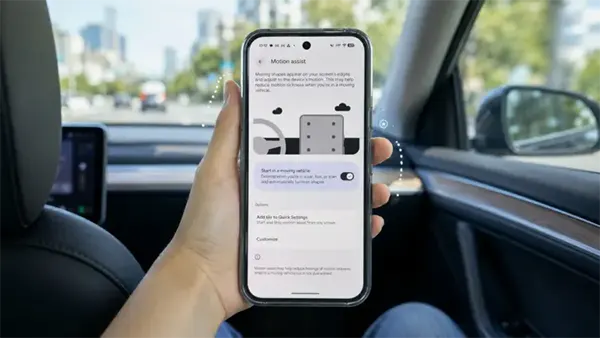
A compatible device needs Android 17 or a later version and updated Google Play Services. The easiest way to check for the feature is to open Settings and search for “Motion assist”. Google’s current instructions also place the control within the Google services area under All services and Personal & device safety. Menu wording can vary slightly between phones, so searching Settings is generally faster than working through several menus. If the option does not appear on an Android 17 phone during the early rollout period, its absence does not automatically mean that the hardware is incompatible.
Once Motion Assist is available, it can be activated manually or configured to start when the phone detects that the user is travelling in a moving vehicle. Google recommends combining automatic activation with a Motion Assist tile in Quick Settings. Automatic detection reduces the need to remember the feature before every journey, while the Quick Settings control provides a convenient backup if the phone does not recognise the journey correctly. It also makes it easier to switch the bubbles off without returning to the full Settings menu.
The appearance is more adjustable than a single fixed set of dots. Android allows the user to change the opacity, colour theme and shape of the visual bubbles. Current options include several colour choices, while the opacity control can make the cues more obvious or more discreet. There is also a randomisation option that can change the colour and shape periodically. A live preview in the settings area helps users judge how noticeable the chosen design will be before using it during a journey.
What You Will Notice on a Real Journey
When the vehicle begins moving and Motion Assist is active, the cues appear around the edges of the display. Their movement changes as the phone detects the motion of the journey, including turns, increases in speed and braking. The important point is that passengers do not have to interpret the bubbles consciously. They simply provide an additional moving reference in peripheral vision while attention remains on the main content. In normal use, this makes the feature feel more like an unobtrusive screen aid than a separate app that needs constant attention.
Visibility can be adjusted according to the activity. Someone reading text may prefer fairly faint bubbles that do not distract from the page, while another passenger may find stronger cues more useful. The most suitable setting is therefore likely to vary from person to person. A more noticeable overlay is not automatically more effective, and there is little reason to make the cues visually dominant if a subtler setting already makes the journey more comfortable.
Automatic vehicle detection is convenient but not guaranteed to identify every journey correctly. Google’s own help documentation notes that the phone may sometimes fail to recognise that it is inside a moving vehicle. This is why the Quick Settings tile is useful even for people who normally leave automatic activation enabled. Availability can also differ while the 2026 rollout is still reaching compatible devices, so users should first confirm that Android 17 and Google Play Services are current before assuming that a missing Motion Assist option is a permanent limitation of their phone.
How Much Can Motion Assist Actually Help With Car Sickness?
Google uses careful wording around Motion Assist, saying that the feature is designed to help reduce motion sickness rather than promising that it will eliminate symptoms. That distinction is important. The basic idea is consistent with established research into sensory conflict and visual motion cues, but the response to travel sickness varies considerably between individuals. A passenger who normally experiences mild discomfort while reading may notice a meaningful improvement, while somebody with strong sensitivity may still become unwell even with the visual cues active.
The scientific reasoning behind the feature is broader than Motion Assist itself. Studies of motion sickness have repeatedly examined the conflict between visual information and the body’s perception of movement, while research into in-vehicle visual cues has found encouraging results in some conditions. The effectiveness can depend on the type of movement, the position of the passenger, what the person is looking at and individual susceptibility. Motion Assist applies this general principle in a convenient smartphone feature, but it should not be treated as a guaranteed remedy or a replacement for medical advice when travel sickness is frequent or severe.
Google also warns that results can vary and that a small proportion of users may actually feel worse while using the feature. Anyone who notices increasing discomfort should therefore turn it off rather than continuing in the hope that the symptoms will disappear. Motion Assist is most useful when viewed as an optional aid: it gives passengers another way to make occasional phone use more comfortable, but it cannot remove the physical movement of the car or every factor that contributes to motion sickness.
When to Put the Phone Away Instead
Motion Assist is intended for passengers, not drivers. Google specifically warns against using the feature while operating a moving vehicle or during any situation that requires full attention for safety. The moving cues do not make reading, messaging or watching content safe while driving. They are designed for somebody who is already free to use a smartphone without responsibility for controlling the vehicle.
If nausea, dizziness or general discomfort begins to increase, the sensible response is to stop concentrating on the screen. Looking outside towards a stable distant reference or the horizon can reduce the visual mismatch that contributes to motion sickness, while simply putting the phone away removes the close visual task that may be making symptoms worse. Motion Assist can make screen use easier for some passengers, but it should not become a reason to continue reading or watching something after the body is already signalling significant discomfort.
For passengers who regularly struggle to use a phone in cars, Motion Assist is a useful addition to Android 17 because it requires little preparation and can operate automatically once configured. Its main advantage is not that it promises to cure travel sickness, but that it adds movement information without seriously interfering with the content on the screen. Used with realistic expectations, it may extend the amount of time some people can comfortably read, browse or watch content during a journey. When it is not enough, looking away from the display and allowing the eyes to reconnect with the actual movement outside the vehicle remains the more sensible choice.